4. 安装PYOCD
当将python安装之后,按下键盘的 win+r 键,在屏幕左下角会弹出一个小窗口,在其输入框中输入 cmd 之后按下回车键:
<img src="http://photos.100ask.net/renesas-docs/DShanMCU_RA6M5/e2studio_use_dap/DShanMCU-RA6M5-DAP-006.png" alt="DShanMCU-RA6M5-DAP-006" />
按照上图点击运行python会得到如下图所示的窗口:

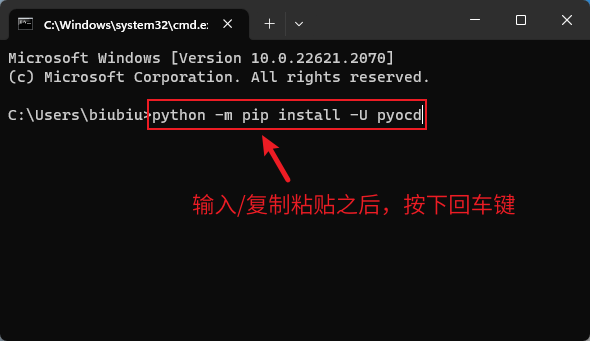
点击选中该窗口,输入/复制粘贴 python -m pip install -U pyocd 然后按回车,之后耐心等待安装完成,如下图所示:
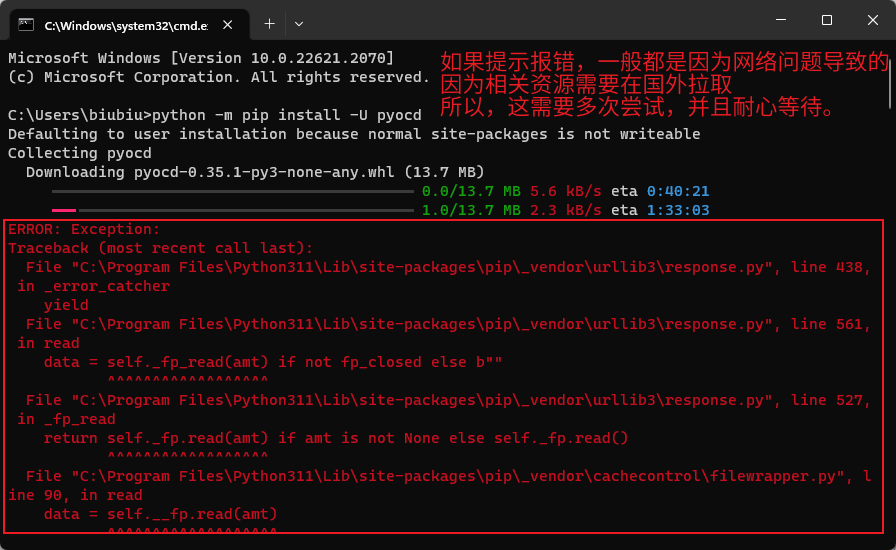
如果提示报错,一般都是因为网络问题导致的,因为相关资源需要在国外拉取,所以,这需要多次尝试,并且耐心等待:
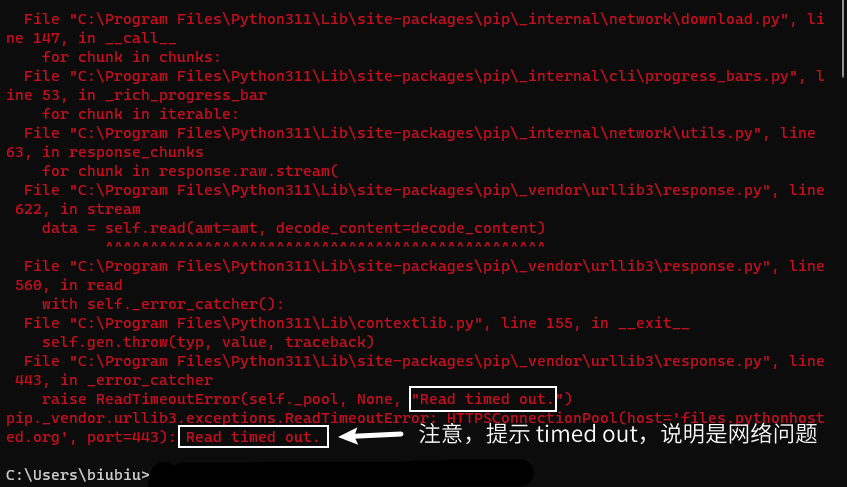
一般都是由于访问国外服务器的问题导致的 timed out 错误,此时我们继续运行 python -m pip install -U pyocd 多尝试几次即可:
可能只需要一次,也可能需要尝试多次,一般在提示出错后重新尝试2-3次可顺利完成,成功界面如下图所示:
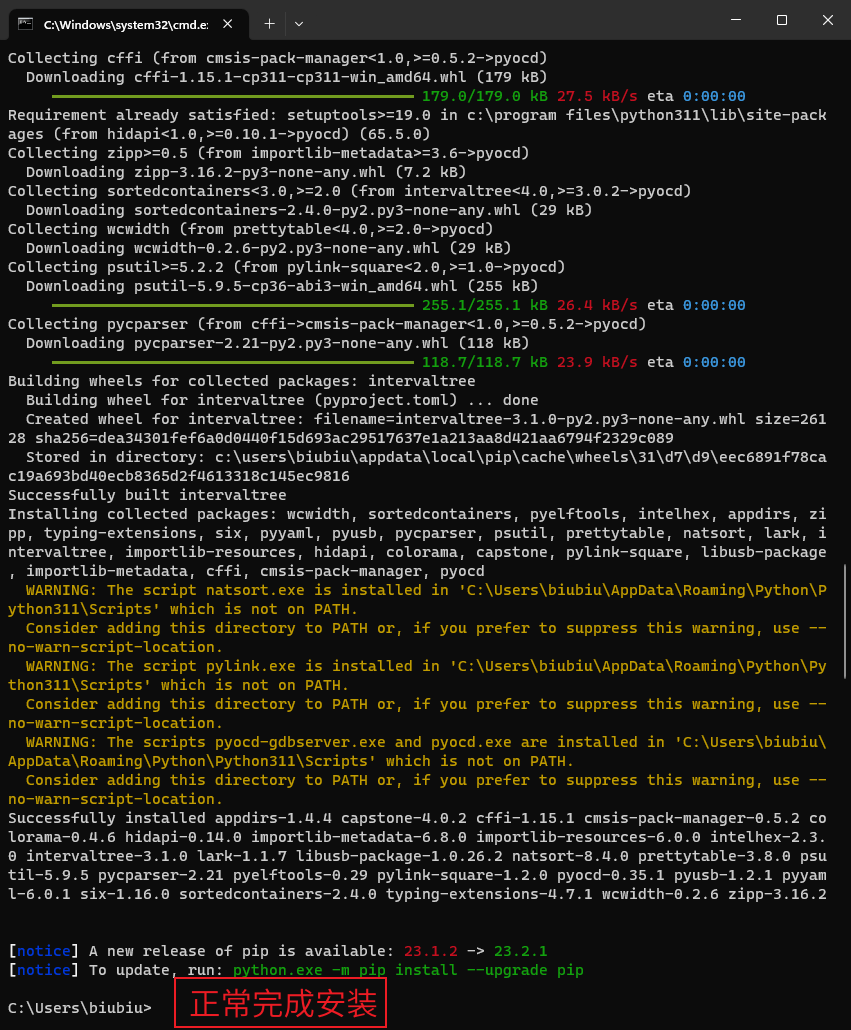
完整的安装过程,截图:
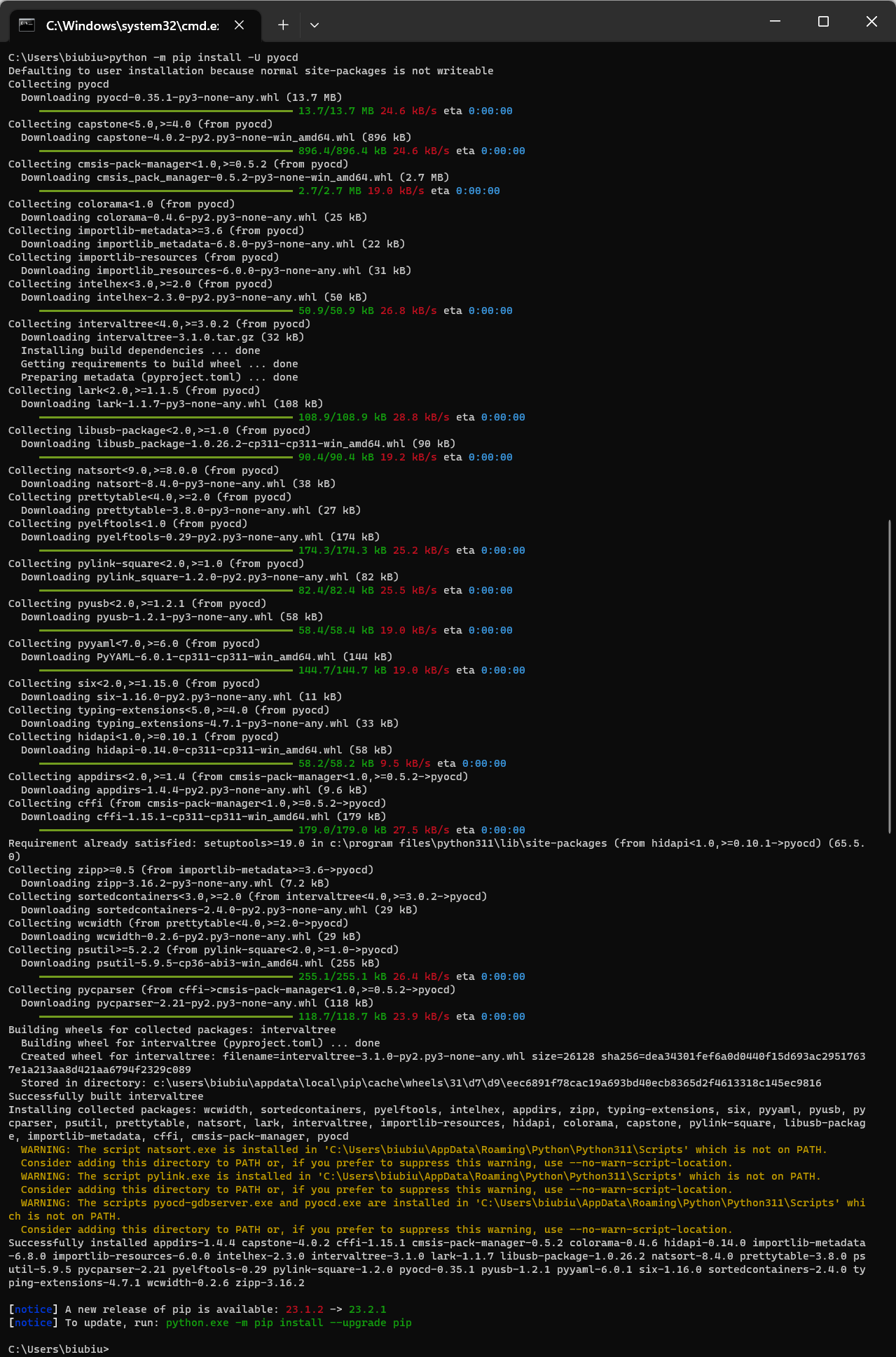
完整安装过程,文字:
C:\Users\biubiu>python -m pip install -U pyocd
Defaulting to user installation because normal site-packages is not writeable
Collecting pyocd
  Downloading pyocd-0.35.1-py3-none-any.whl (13.7 MB)
     ━━━━━━━━━━━━━━━━━━━━━━━━━━━━━━━━━━━━━━━━ 13.7/13.7 MB 24.6 kB/s eta 0:00:00
Collecting capstone<5.0,>=4.0 (from pyocd)
  Downloading capstone-4.0.2-py2.py3-none-win_amd64.whl (896 kB)
     ━━━━━━━━━━━━━━━━━━━━━━━━━━━━━━━━━━━━━━━━ 896.4/896.4 kB 24.6 kB/s eta 0:00:00
Collecting cmsis-pack-manager<1.0,>=0.5.2 (from pyocd)
  Downloading cmsis_pack_manager-0.5.2-py3-none-win_amd64.whl (2.7 MB)
     ━━━━━━━━━━━━━━━━━━━━━━━━━━━━━━━━━━━━━━━━ 2.7/2.7 MB 19.0 kB/s eta 0:00:00
Collecting colorama<1.0 (from pyocd)
  Downloading colorama-0.4.6-py2.py3-none-any.whl (25 kB)
Collecting importlib-metadata>=3.6 (from pyocd)
  Downloading importlib_metadata-6.8.0-py3-none-any.whl (22 kB)
Collecting importlib-resources (from pyocd)
  Downloading importlib_resources-6.0.0-py3-none-any.whl (31 kB)
Collecting intelhex<3.0,>=2.0 (from pyocd)
  Downloading intelhex-2.3.0-py2.py3-none-any.whl (50 kB)
     ━━━━━━━━━━━━━━━━━━━━━━━━━━━━━━━━━━━━━━━━ 50.9/50.9 kB 26.8 kB/s eta 0:00:00
Collecting intervaltree<4.0,>=3.0.2 (from pyocd)
  Downloading intervaltree-3.1.0.tar.gz (32 kB)
  Installing build dependencies ... done
  Getting requirements to build wheel ... done
  Preparing metadata (pyproject.toml) ... done
Collecting lark<2.0,>=1.1.5 (from pyocd)
  Downloading lark-1.1.7-py3-none-any.whl (108 kB)
     ━━━━━━━━━━━━━━━━━━━━━━━━━━━━━━━━━━━━━━━━ 108.9/108.9 kB 28.8 kB/s eta 0:00:00
Collecting libusb-package<2.0,>=1.0 (from pyocd)
  Downloading libusb_package-1.0.26.2-cp311-cp311-win_amd64.whl (90 kB)
     ━━━━━━━━━━━━━━━━━━━━━━━━━━━━━━━━━━━━━━━━ 90.4/90.4 kB 19.2 kB/s eta 0:00:00
Collecting natsort<9.0,>=8.0.0 (from pyocd)
  Downloading natsort-8.4.0-py3-none-any.whl (38 kB)
Collecting prettytable<4.0,>=2.0 (from pyocd)
  Downloading prettytable-3.8.0-py3-none-any.whl (27 kB)
Collecting pyelftools<1.0 (from pyocd)
  Downloading pyelftools-0.29-py2.py3-none-any.whl (174 kB)
     ━━━━━━━━━━━━━━━━━━━━━━━━━━━━━━━━━━━━━━━━ 174.3/174.3 kB 25.2 kB/s eta 0:00:00
Collecting pylink-square<2.0,>=1.0 (from pyocd)
  Downloading pylink_square-1.2.0-py2.py3-none-any.whl (82 kB)
     ━━━━━━━━━━━━━━━━━━━━━━━━━━━━━━━━━━━━━━━━ 82.4/82.4 kB 25.5 kB/s eta 0:00:00
Collecting pyusb<2.0,>=1.2.1 (from pyocd)
  Downloading pyusb-1.2.1-py3-none-any.whl (58 kB)
     ━━━━━━━━━━━━━━━━━━━━━━━━━━━━━━━━━━━━━━━━ 58.4/58.4 kB 19.0 kB/s eta 0:00:00
Collecting pyyaml<7.0,>=6.0 (from pyocd)
  Downloading PyYAML-6.0.1-cp311-cp311-win_amd64.whl (144 kB)
     ━━━━━━━━━━━━━━━━━━━━━━━━━━━━━━━━━━━━━━━━ 144.7/144.7 kB 19.0 kB/s eta 0:00:00
Collecting six<2.0,>=1.15.0 (from pyocd)
  Downloading six-1.16.0-py2.py3-none-any.whl (11 kB)
Collecting typing-extensions<5.0,>=4.0 (from pyocd)
  Downloading typing_extensions-4.7.1-py3-none-any.whl (33 kB)
Collecting hidapi<1.0,>=0.10.1 (from pyocd)
  Downloading hidapi-0.14.0-cp311-cp311-win_amd64.whl (58 kB)
     ━━━━━━━━━━━━━━━━━━━━━━━━━━━━━━━━━━━━━━━━ 58.2/58.2 kB 9.5 kB/s eta 0:00:00
Collecting appdirs<2.0,>=1.4 (from cmsis-pack-manager<1.0,>=0.5.2->pyocd)
  Downloading appdirs-1.4.4-py2.py3-none-any.whl (9.6 kB)
Collecting cffi (from cmsis-pack-manager<1.0,>=0.5.2->pyocd)
  Downloading cffi-1.15.1-cp311-cp311-win_amd64.whl (179 kB)
     ━━━━━━━━━━━━━━━━━━━━━━━━━━━━━━━━━━━━━━━━ 179.0/179.0 kB 27.5 kB/s eta 0:00:00
Requirement already satisfied: setuptools>=19.0 in c:\program files\python311\lib\site-packages (from hidapi<1.0,>=0.10.1->pyocd) (65.5.0)
Collecting zipp>=0.5 (from importlib-metadata>=3.6->pyocd)
  Downloading zipp-3.16.2-py3-none-any.whl (7.2 kB)
Collecting sortedcontainers<3.0,>=2.0 (from intervaltree<4.0,>=3.0.2->pyocd)
  Downloading sortedcontainers-2.4.0-py2.py3-none-any.whl (29 kB)
Collecting wcwidth (from prettytable<4.0,>=2.0->pyocd)
  Downloading wcwidth-0.2.6-py2.py3-none-any.whl (29 kB)
Collecting psutil>=5.2.2 (from pylink-square<2.0,>=1.0->pyocd)
  Downloading psutil-5.9.5-cp36-abi3-win_amd64.whl (255 kB)
     ━━━━━━━━━━━━━━━━━━━━━━━━━━━━━━━━━━━━━━━━ 255.1/255.1 kB 26.4 kB/s eta 0:00:00
Collecting pycparser (from cffi->cmsis-pack-manager<1.0,>=0.5.2->pyocd)
  Downloading pycparser-2.21-py2.py3-none-any.whl (118 kB)
     ━━━━━━━━━━━━━━━━━━━━━━━━━━━━━━━━━━━━━━━━ 118.7/118.7 kB 23.9 kB/s eta 0:00:00
Building wheels for collected packages: intervaltree
  Building wheel for intervaltree (pyproject.toml) ... done
  Created wheel for intervaltree: filename=intervaltree-3.1.0-py2.py3-none-any.whl size=26128 sha256=dea34301fef6a0d0440f15d693ac29517637e1a213aa8d421aa6794f2329c089
  Stored in directory: c:\users\biubiu\appdata\local\pip\cache\wheels\31\d7\d9\eec6891f78cac19a693bd40ecb8365d2f4613318c145ec9816
Successfully built intervaltree
Installing collected packages: wcwidth, sortedcontainers, pyelftools, intelhex, appdirs, zipp, typing-extensions, six, pyyaml, pyusb, pycparser, psutil, prettytable, natsort, lark, intervaltree, importlib-resources, hidapi, colorama, capstone, pylink-square, libusb-package, importlib-metadata, cffi, cmsis-pack-manager, pyocd
  WARNING: The script natsort.exe is installed in 'C:\Users\biubiu\AppData\Roaming\Python\Python311\Scripts' which is not on PATH.
  Consider adding this directory to PATH or, if you prefer to suppress this warning, use --no-warn-script-location.
  WARNING: The script pylink.exe is installed in 'C:\Users\biubiu\AppData\Roaming\Python\Python311\Scripts' which is not on PATH.
  Consider adding this directory to PATH or, if you prefer to suppress this warning, use --no-warn-script-location.
  WARNING: The scripts pyocd-gdbserver.exe and pyocd.exe are installed in 'C:\Users\biubiu\AppData\Roaming\Python\Python311\Scripts' which is not on PATH.
  Consider adding this directory to PATH or, if you prefer to suppress this warning, use --no-warn-script-location.
Successfully installed appdirs-1.4.4 capstone-4.0.2 cffi-1.15.1 cmsis-pack-manager-0.5.2 colorama-0.4.6 hidapi-0.14.0 importlib-metadata-6.8.0 importlib-resources-6.0.0 intelhex-2.3.0 intervaltree-3.1.0 lark-1.1.7 libusb-package-1.0.26.2 natsort-8.4.0 prettytable-3.8.0 psutil-5.9.5 pycparser-2.21 pyelftools-0.29 pylink-square-1.2.0 pyocd-0.35.1 pyusb-1.2.1 pyyaml-6.0.1 six-1.16.0 sortedcontainers-2.4.0 typing-extensions-4.7.1 wcwidth-0.2.6 zipp-3.16.2

[notice] A new release of pip is available: 23.1.2 -> 23.2.1
[notice] To update, run: python.exe -m pip install --upgrade pip

C:\Users\biubiu>
到这里,PYOCD的安装顺利完成!
<center>本节完</center>
<div></div>